Introduction
The three distinct CFD platforms: Algorizk’s Wind Tunnel Free, the Airfoil Design app, and SimScale, has been carefully selected for its unique features and functionalities, aiming to create a comprehensive educational environment for students interested in delving into fluid dynamics.
The platforms served to fulfill the overarching goal of creating an engaging and educational experience for students interested in exploring fluid dynamics through computational modeling. Through the exploration of these platforms, students will be empowered to gain practical insights into fluid dynamics concepts and develop essential skills that are invaluable for their academic and professional pursuits.
Wind Tunnel CFD
Wind Tunnel CFD, is a powerful incompressible Navier Stokes Solver, developed collaboratively by NUMECA and ALGORIZK, serves as a robust educational tool in the realm of Computational Fluid Dynamics (CFD).
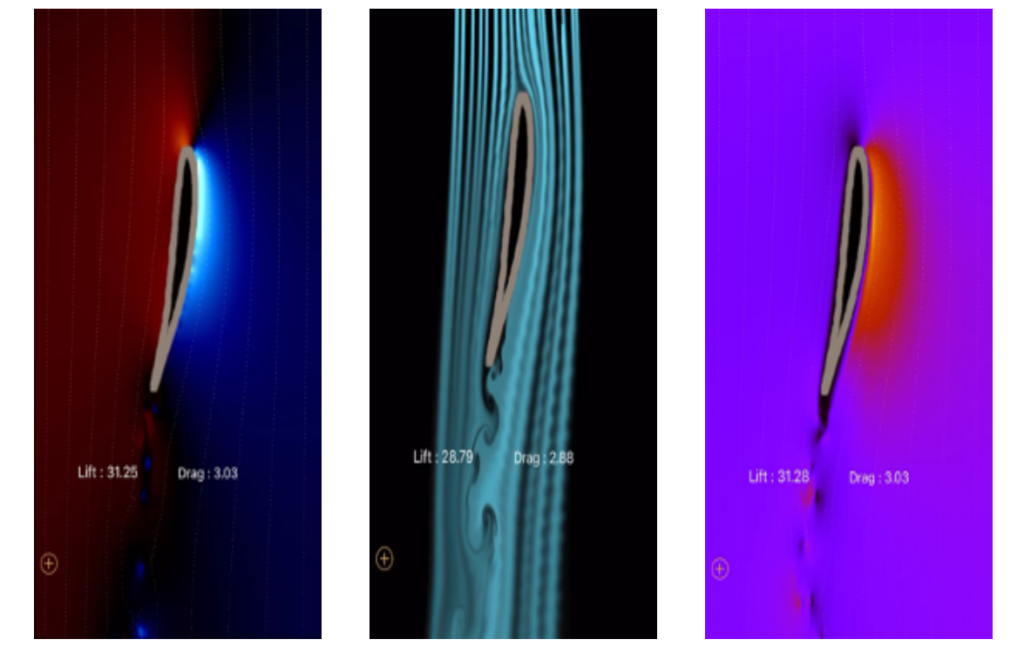
Key Features
This application offers a range of features:
- Custom Geometry: Users can define or import shapes and adjust numerical settings.
- Visualization: Explore physical fields, particles, and colored smoke with customizable settings.
- Configuration Management: Save and load custom configurations.
- Predefined Cases: Access predefined scenarios such as circle cylinder Re=3900, square cylinder Re=500, and more.
User Interaction
Wind Tunnel CFD provides an interactive interface through touch, visualization, and simulation menus. Users can manipulate fluid flow, create custom shapes, adjust parameters, and simulate wind tunnel or free modes.
The iOS application features intuitive menus:
- Touch Menu: Interact, draw, insert, or erase elements.
- Visualization Menu: Control particles, smoke, pressure, and speed.
- Simulation Menu: Choose between wind tunnel and free modes.
- Additional Options: Calculate flow parameters, load specific airfoil shapes, and reset settings.
Limitations
Although Wind Tunnel CFD demonstrates proficiency in qualitative flow descriptions, it exhibits limitations in providing quantitative data. Furthermore, the predefined cases offered by the platform might not encompass all real-world scenarios, thus potentially constraining users’ ability to explore diverse situations effectively.
Conclusion
Wind Tunnel CFD, developed by NUMECA, delivers a valuable educational experience by seamlessly integrating theoretical concepts into its fluid dynamics flow visualizations. Its immersive features and intuitive interface grant students a distinctive opportunity to actively participate in CFD simulations. Nevertheless, it’s crucial to acknowledge that while Wind Tunnel CFD enhances qualitative understanding, it may encounter limitations in offering quantitative data and encompassing all real-world scenarios. These constraints could potentially affect the breadth of users’ exploration capabilities.
Airfoil Design
The Airfoil Design application emerges as a robust tool for crafting and analyzing aircraft wing sections. Equipped with advanced numerical methods, mesh generation algorithms, and CFD simulations, it caters to both seasoned aerospace engineers and students keen on delving into aerodynamics. At its core, Airfoil Design aims to empower users to create and assess intricate airfoil geometries, offering real-time insights into their aerodynamic behavior through CFD simulations.
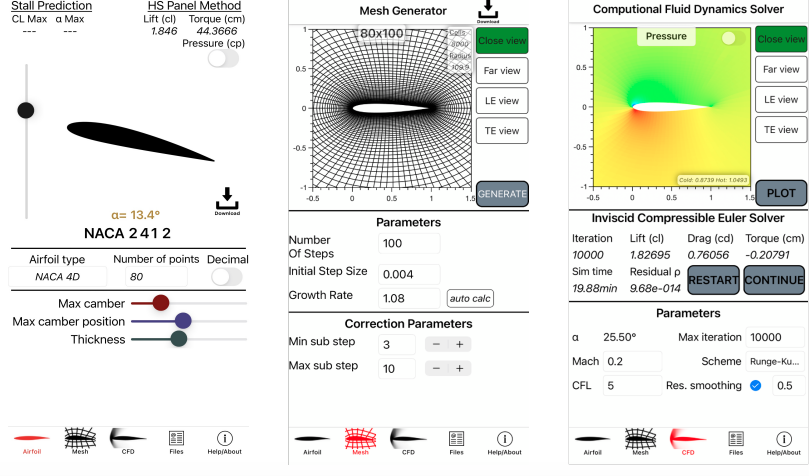
Key Features
The airfoil design application incorporates several key features that enhance its functionality and usability:
Airfoil Generation: Create airfoil geometries using four distinct types: NACA 4 digits, NACA 5 digits, Modified NACA 4 digits, and Modified NACA 5 digits. This feature provides users with a wide range of options for designing airfoils to suit their specific needs.
Real-time Adjustment: Fine-tune airfoil shapes in real-time using intuitive sliders. This functionality facilitates the observation of aerodynamic coefficient changes, enabling users to make precise adjustments to their designs.
Airfoil Importation: Import airfoils from the airfoil tool database, expanding design possibilities. This feature allows users to access a broader range of airfoil geometries and seamlessly incorporate them into their designs.
Mesh Generation: Provides a customizable mesh generator capable of generating O-type grid meshes. Users can adjust parameters such as steps, initial step size, and growth rate to tailor the mesh to their specific requirements, ensuring optimal simulation results.
Simulation Enhancements: Allows enhancements to the simulation process, including the ability to continue simulations after pausing, view residual convergence, and generate Cp vs X graphs in post-treatment. These enhancements improve the overall simulation experience for users, making it more efficient and effective.
User-friendly Interface: Provides a user-friendly interface that allows users to navigate effortlessly through airfoil design, mesh generation, simulation, and file management processes. Distinct windows and intuitive controls ensure a seamless user experience, contributing to increased productivity and satisfaction.
User Interaction
The application provides an intuitive interface with dedicated windows for each step in the design and simulation journey. Users can seamlessly:
- Select airfoil types and adjust characteristics in the initial window.
- Define mesh parameters, correction parameters, and generate meshes in the subsequent window.
- Execute simulations and save results in the following windows.
Limitations
Numerous thorough simulations were conducted using the airfoil design application to analyze 2D external flow around airfoils. The focus was on predicting crucial aerodynamic parameters such as lift and drag coefficients, as well as pressure distributions, across varying angles of attack (AOA) relative to the chord length ‘c’. Our research indicates a significant alignment between the coefficients of pressure obtained from simulations, test data, and NASA’s CFD codes, highlighting the application’s accuracy in representing pressure distributions along the airfoil surface. Additionally, the coefficient of lift values demonstrates a strong correlation with experimental data and other simulation results up to the point of stall, showcasing the Airfoil Design App’s capability in accurately predicting lift and drag forces within an inviscid flow regime.
However, it is imperative to acknowledge the limitations of the application. The employed solvers do not account for viscous effects, such as drag, flow separation, and stall. Consequently, the application’s accuracy is primarily limited to scenarios where these viscous effects play a minimal role. These limitations stem from the chosen computational methods, which may not adequately capture the complexities of drag and stall induced by flow separation. Thus, it is essential to note the following limitations:
Inviscid Flow Assumption: The Euler solver does not consider viscous effects, resulting in inaccuracies in drag and flow separation modeling.
Hess-Smith Panel Method Assumptions: Limitations related to two-dimensionality, inviscid and incompressible flow, and steady-state conditions may affect drag and stall accuracy.
Accuracy Limited to Inviscid Flow Regime: The application’s accuracy is optimal up to the point of stall in scenarios where viscous effects play a minimal role.
Viscous Effects Not Accounted For: The solvers do not consider viscous effects like drag, flow separation, and stall, contributing to specific inaccuracies.
Conclusion
While the app offers a rich feature set, a user-friendly interface, and ongoing updates, its accuracy is primarily tailored to scenarios with minimal viscous effects. Additional analyses are warranted for precise predictions in situations where viscous effects become significant, particularly at or beyond the stall point. Despite its limitations, the app serves as a comprehensive platform for aerodynamic studies, providing valuable insights into airfoil performance while acknowledging its constraints.
Simscale
SimScale represents a groundbreaking cloud-based simulation platform that revolutionizes engineering simulations by seamlessly integrating every aspect of the simulation workflow. This section delves into SimScale’s features, functionality, and technology, demonstrating its ability to make simulation accessible and cost-effective for various organizations.
Key Features
Efficiency in the Cloud
- True Software as a Service (SaaS) model provides instant access from any browser, eliminating the need for VPNs or remote desktops.
- No special hardware requirements ensure accessibility and flexibility for users.
Comprehensive Physics Capabilities
- Unified platform covers a wide range of physics domains, including structural mechanics, fluid dynamics, thermodynamics, and electromagnetics.
- Offers a seamless experience for simulations at both early and late stages, eliminating the need for disjointed tools.
Real-time Collaboration
- In-app collaboration features enable real-time support and effortless sharing of simulations, like Google Docs.
Scalability
- No practical limits on simulation size, parallel simulations, or storage capacity.
- Supports various simulation scales, from single runs to programmatic design space exploration.
Integrated Physics and Simulation Methods
- All physics are seamlessly integrated within the platform.
- Utilizes state-of-the-art methods with robust pre-processing, high-performance solvers, and integrated 3D post-processing capabilities.
User Interaction
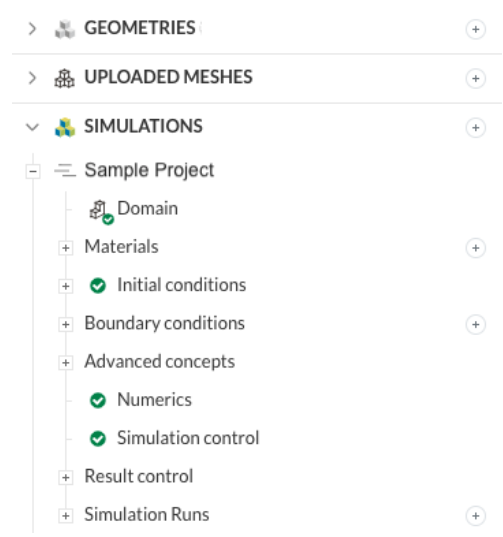
Users can access simulation capabilities graphically via the SimScale Workbench.
1. Graphical Interface: The SimScale Workbench provides a visual interface that simplifies the process of setting up, running, and post-processing simulations. Users can navigate through different simulation stages, such as geometry preparation, meshing, setting up boundary conditions, running simulations, and analyzing results, all within a single, intuitive environment.
2. Geometry Preparation: Users can import CAD models directly into the SimScale Workbench or create geometry within the platform using built-in modeling tools. The Workbench offers various options for geometry manipulation, allowing users to modify and prepare their models for simulation.
3. Meshing: The Workbench facilitates the generation of high-quality meshes suitable for various simulation types, including structural mechanics, fluid dynamics, and thermal analysis. Users can control mesh parameters and settings to ensure mesh quality and accuracy.
4. Boundary Conditions: Through the Workbench, users can define boundary conditions, material properties, and simulation settings for their models. This includes specifying parameters such as flow velocities, temperatures, and forces acting on the geometry.
5. Simulation Setup: Users can set up simulations directly within the Workbench, choosing from a range of simulation types and solvers available on the SimScale platform. The Workbench guides users through the setup process, helping them configure simulation settings and parameters according to their specific requirements.
6. Running Simulations: Once the simulation setup is complete, users can initiate simulations directly from the Workbench interface. Simulations run on SimScale’s cloud-based infrastructure, allowing users to offload computational tasks and access high-performance computing resources for faster and more efficient simulations.
7. Post-processing: After simulations are completed, users can visualize and analyze results within the Workbench. The platform offers various post-processing tools and visualization options, allowing users to examine simulation outputs, generate plots and graphs, and extract relevant engineering data for further analysis and interpretation.
Overall, the SimScale Workbench provides users with a comprehensive and user-friendly interface for conducting simulations, enabling engineers, designers, and researchers to explore and optimize their designs effectively in a collaborative and cloud-based environment.
Conclusion
SimScale redefines the landscape of engineering simulations with its cloud-native platform, offering accessibility and power. With its broad physics capabilities, real-time collaboration features, and cost-effectiveness, SimScale serves as a transformative solution for organizations looking to fully leverage engineering simulations.